| Сегодня 20 марта, пятница |
      |
  
|

  
Какой рейтинг вас больше интересует?
|
Главная /
Каталог блоговCтраница блогера TUTSOFT - INFO BLOG/Записи в блоге |



 |
TUTSOFT - INFO BLOG
Голосов: 1 Адрес блога: http://tutsoft-info.blogspot.com/ Добавлен: 2012-04-05 23:56:43 блограйдером samopir |
Leawo Total DVD Converter Platinum
2012-11-03 01:11:00 (читать в оригинале)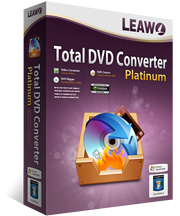
Leawo Total DVD Converter Platinum
Leawo Total DVD Converter Platinum can rip DVD, convert video and create DVD. Key Features of Leawo Total DVD Converter Suite:
1.Rip DVD to popular video audio formats Total DVD Converter Suite can decrypt and convert DVD to popular formats like AVI, MP4 and WMV with quality profiles. It can also copy DVD movie to hard disk without quality loss, convert DVD to HD video format and rip DVD music to audio files.
2.Convert video or audio between various formats Do video to video, video to audio and audio to audio conversions in this universal DVD Converter Suite with up to a hundred formats supported for input and output.
3.Burn video or audio to DVD Burn a wide range of video audio formats (AVI, MP4, WMV, etc) to various DVD formats: NTSC, PAL/SECAM, 720p/i, 1080p/i. It is easy and fast to create a compatible DVD for all DVD players.
4.Fast output to various portable devices Total DVD Converter Suite supports many popular multimedia devices, including iPod, iPhone, PSP, PS3, Zune, Apple TV, Mobile Phone, Windows Mobile, Pocket PC, Xbox, Wii, Archos, Creative Zen and iRiver. There are established profiles for the convenience and quality of your conversions.
5.Powerful video editing functions Custom video output is available via powerful video editing functions: Effect, Trim, Crop, Logo and Text. With these useful features, you can adjust video effect in brightness, contrast and audio volume, cut video duration in milliseconds, crop video size and change aspect ratio and add image or text watermark.
6.Built-in preview and one-click screenshot Play imported video in the built-in player, capture any screenshots freely and then save them as JPEG, BMP or THM image files.
7.Batch conversion and after-done functions You can add as many video files as you want to convert. Total DVD Converter Suite will process the video files all in one go. Useful after-done functions are available either to open output folder or shut down computer upon your choice.

Leawo Mac iPad Converter
2012-11-03 01:05:00 (читать в оригинале)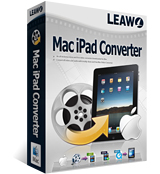
Leawo Mac iPad Converter
Convert almost all popular video and audio files such as AVI, MP4, MPEG, MOV, AAC, OGG, WAV to iPad supported formats such as MP4, MP3, WAV, etc. This Leawo iPad Video Converter for Mac is a professional and powerful Mac iPad converter. This Mac iPad converter software provides a series of settings such as video crop, video trim, video watermark, batch conversion, and setting video brightness, contrast and saturation, and even joining multiple files into one. Thus with the fast conversion speed and excellent output quality, this Mac iPad converter lets you easily convert whatever formats you need and then have better enjoyment.
KEY FEATURES of Leawo Mac iPad Converter:
1. Convert all popular video formats to iPad video file.
2. Support popular Portable players.
3. Extract audio from original video files.
4. Trim video to retain a short duration.
5. Crop video to extract the video black margins.
6. Set audio and video effects: video brightness and contrast, audio volume, etc.
7. Make the original video quality better.
8. Support batch video conversion to convert multiple video files at a time.
9. Merge all added files and convert into a large video file.
10. User-friendly video to iPad video file for Mac conversion interface.
11. Fast conversion speed and excellent output quality.
12. No machine performance requirement for video conversion.

Rocket Launch
2012-11-03 00:54:00 (читать в оригинале)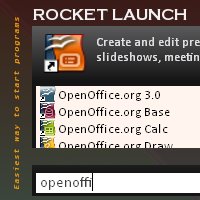
Rocket Launch
Rocket Launch makes it easy to launch any program by just typing part of the name of the program that needs to be launched. As characters are typed, possible matches are shown in the window. You can use up/down arrow keys to navigate through the matches. To launch the program, just navigate to the program and hit enter. Unlike most of other alternative software, Rocket Launch uses an advanced algorithm to find matches as fast as possible. Even for an extremely large start menu, Rocket Launch will find what you need in millisecond latency! How to use Rocket Launch To launch Rocket Launch, type in the key combination. You can configure the key combination using configuration dialog box. (See Configuration section). Once launched, just type few characters of the program you wish to launch in to the search box. For example, if you like to launch Notepad, just type in note and it will show the matches including Notepad. The higher the number of characters you type, the lower the number of matches found. (Matching is case insensitive.). Use Up/Down arrow keys to navigate to the program you need and hit enter. This will simultaneously launch the program as well as dismiss the Rocket Launch window.

Yesterdata Data Recovery
2012-11-03 00:50:00 (читать в оригинале)
Yesterdata Data Recovery
Yesterdata Data Recovery is really powerful to recover deleted and lost files. It's for all Windows File Systems. When you accidentally deleted files,formatted HDD,Empty Recycle Bin or the HDD partitions lost or damaged, you can get your files back with Yesterdata Data Recovery. What's more, you can also recover your data from U disk and other cards such as your phone and camera memory card.Yesterdata Data Recovery will be your best data recovery software. Don't hesitate to contact us via support@yesterdata.net (Email and MSN) when you have any questions. 
A-Cisco CCNA Lesson 1
2012-10-31 02:07:00 (читать в оригинале)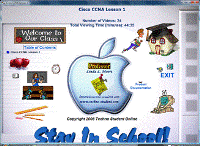
A-Cisco CCNA Lesson 1
The Cisco training videos contained in this product will help novice users as well as technical professionals master the Cisco Internetwork Operating System. The videos contain lecture and step-by-step demonstrations on how to configure the Cisco IOS. There are a total of 24 videos in this product consisting of 44:35 minutes of viewing time. The following subjects are covered in this lesson: Cisco Router Lesson 1 Objectives, Router Memory Storage, Random Access Memory, Non Volatile RAM NVRAM, Flash Memory, Read Only Memory ROM, LAN and WAN Interface Components, Terminal Emulation Software, Console Connection Combinations, Console and Auxiliary Port Communication Parameters, The Login Process, IOS Administrative Modes, User Mode, Privileged Mode, Configuration Mode, Interface Level Configuration, Command Line Interface Keys, Cisco Router Passwords, Cisco Router Lab Setup, Cisco Router Lab 1 Objectives, Configuring FastEthernet Interface, Secure Console Port Auxilary Port and VTY lines, Displaying Router Information




Категория «Блогосфера»
Взлеты Топ 5
 | ||
|
+1241 |
1261 |
Robin_Bad |
|
+1175 |
1263 |
Futurolog |
|
+1090 |
1094 |
MySQL Performance Blog |
|
+1028 |
1098 |
Ksanexx |
|
+1023 |
1097 |
Refinado |
Падения Топ 5
 | ||
|
-2 |
511 |
партнерки |
|
-3 |
605 |
Блог о раскрутке и монетизации сайта. |
|
-3 |
86 |
Mandalaй.ru |
|
-4 |
589 |
Блог Демона |
|
-4 |
17 |
Выводы простого человека |

Популярные за сутки
Загрузка...

BlogRider.ru не имеет отношения к публикуемым в записях блогов материалам. Все записи
взяты из открытых общедоступных источников и являются собственностью их авторов.
взяты из открытых общедоступных источников и являются собственностью их авторов.