| Сегодня 6 августа, четверг |
      |
  
|

  
Какой рейтинг вас больше интересует?
|
Главная /
Каталог блоговCтраница блогера TUTSOFT - INFO BLOG/Записи в блоге |



 |
TUTSOFT - INFO BLOG
Голосов: 1 Адрес блога: http://tutsoft-info.blogspot.com/ Добавлен: 2012-04-05 23:56:43 блограйдером samopir |
NZip Sales Software
2013-07-24 15:37:00 (читать в оригинале)
NZip Sales Software
NZip Sales Package is used to manage Inventory, Sales, Purchases and Accounting for Apparels, Boutiques, Shops, Stores.

Some features are:
• Front-Sales Panel for Billing
• Back-Office Panel for Maintenance
• Products, Coupons, Customers, Suppliers
• Billing, Quote, Purchase, Order, Accounting
• Import, Export, Closing, Trend
• Product, Coupon, Billing, Purchase Lists
• Daily, Monthly, Product, Group Sales
• Recon, Ledger, Fast/Slow Items
• Groups, Accounts, Quote/Order Lists
• Enterprise Details, Users, Options
• Billing Preferences, Customization
• Operational Help
Perfect Diet Tracker - Personal license
2013-07-24 15:33:00 (читать в оригинале)
Perfect Diet Tracker - Personal license
Award winning software based on firm scientific foundations designed to help you lose weight, and keep it off!
The Perfect Diet Tracker is very easy to use and includes access to an extensive database of products with absolutely no ongoing subscription fees.
Downloads are available for Microsoft Windows, Apple Mac OS X and Linux systems. The product code issued by Register Now after purchase is a full 'cross platform key' so it does not matter which version you have, you can gain access to the full edition immediately.
Download

SQLite Expert Professional (site license)
2013-07-24 12:31:00 (читать в оригинале)
SQLite Expert Professional (site license)
SQLite Expert Professional 3.0
SQLite Expert is a powerful visual tool that enables you to easily administer your SQLite3 databases and gain significantly better visibility into how your databases are operating. SQLite Expert integrates database management and maintenance into a single, seamless environment, with a clear and intuitive graphical user interface.
Features and Benefits
By using SQLite Expert you will be able to:
- Edit tables and views visually, without writing a line of SQL. Easily restructure fields, indexes, constraints, triggers without losing data already existing in the tables.
- Build SQL scripts and generate views visually using the integrated Query Builder.
- Create SQLite3 databases, view and change database parameters, check database integrity and vacuum (compact) databases.
- Easily transfer data between SQLite databases, import data from SQL scripts or ADO data sources, or export to SQL scripts.
- Display and edit data in the grid, including BLOB and image fields. Currently supports BMP, JPG and PNG image formats. BLOB fields can be edited with the integrated hex editor.
- Execute SQL queries and display results in the grid or as text.
- Generate HTML reports from data displayed in the grid.
| |||||||||||||||||||||
| |||||||||||||||||||||
| |||||||||||||||||||||
| |||||||||||||||||||||
| |||||||||||||||||||||
| |||||||||||||||||||||
| |||||||||||||||||||||
| |||||||||||||||||||||
| |||||||||||||||||||||
| |||||||||||||||||||||
| |||||||||||||||||||||
| |||||||||||||||||||||
| |||||||||||||||||||||
| |||||||||||||||||||||
| |||||||||||||||||||||
| |||||||||||||||||||||
| |||||||||||||||||||||
|


Pinnacle Studio Ultimate
2013-07-24 12:15:00 (читать в оригинале)Create Pro Videos and Multimedia—Fast and Easy
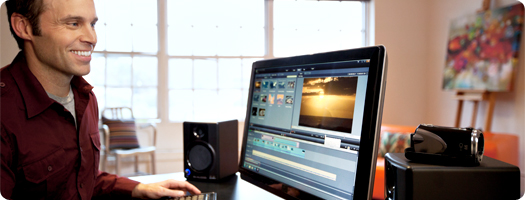
Pinnacle Studio Ultimate
Pinnacle Studio Ultimate is the easy-to-use power tool for creating professional-looking HD and 3D videos and multimedia. You get all the features and trusted technology from Pinnacle Studio Plus and more—advanced stereoscopic 3D, precision editing, enhanced media tagging, Scorefitter soundtracks, and Blu-ray™ authoring. Edit anywhere on an unlimited number of tracks with integral cloud access and Pinnacle Studio for iPad project importing. Easily superimpose people over different backgrounds with the included green screen1. Energize your videos with 2000+ 2D/3D transitions, effects and templates—plus the awesome Red Giant Filmmaker’s Toolkit and Motion Graphics Toolkit.
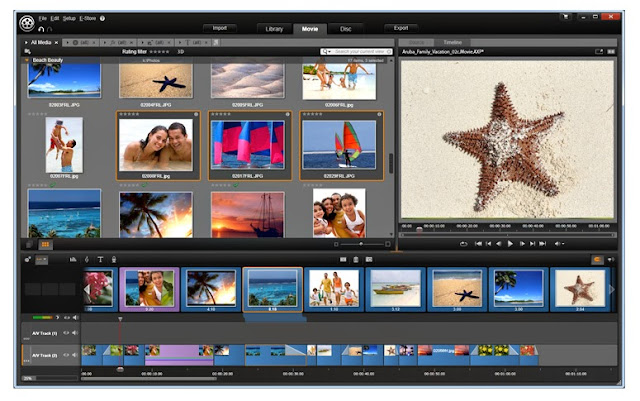
Key Features
- Edit on unlimited tracks with frame accuracy in HD and/or advanced stereoscopic 3D
- Create eye-popping effects with Red Giant Filmmaker’s Toolkit and Motion Graphics Toolkit
- Add excitement with over 2000 2D/3D additional effects
- Includes green screen for shooting with superimposition in mind
- Create Dolby® 5.1 surround Blu-ray™/DVD discs and export to your favorite digital devices and formats
- Organize, tag, and rate your favorite clips and music with the built-in media library
- Enhance and correct movies, photos and audio right inside the media library
- Preview timeline and source clips simultaneously
- Use the trim editor to set source clip in/out points, then drag trimmed clips to the timeline for perfect cuts—just like the pros
- Import clips and movie projects from Pinnacle Studio for iPad2
- Quickly learn to make great videos using the included video tutorial DVDs
- Storyboard quick first drafts—even create movies automatically
- Layer animations and titles easily with included Montage templates
- Create custom-fit soundtracks with Scorefitter
- Share HD and 3D videos on Facebook®, YouTube®, and Vimeo® with one click
- Store projects and clips in the cloud to access anywhere, anytime—includes 50 GB3 of cloud access free from Box
- Zip through projects via 64-bit, NVIDIA® CUDA™, and Intel® Quick Sync Video optimization
- Access video and photos from HD camcorders and digital devices—even 3D
- Easily archive and restore your work with Project Packages

The Pinnacle Studio 16 family is the only video editing software powered by trusted award-winning Pinnacle technology, yet streamlined to help you easily create incredible movies in HD or stereoscopic 3D. Built-in media cloud access makes your files available anywhere, anytime—including projects started on Pinnacle Studio for iPad. Spice things up with thousands of effects, then share your videos on Facebook, YouTube, and Vimeo with one click. With included video tutorials, you’ll be creating movies like a pro immediately. Pinnacle Studio 16, Pinnacle Studio 16 Plus and Pinnacle Studio 16 Ultimate let you choose the sophistication you need.
Download the free 30-day trial
Nero Video 12
2013-07-24 11:50:00 (читать в оригинале)Realize your moviemaking dreams

Nero Video 12
Everything You Need to Capture, Edit, Author, Burn & Share Home Movies
- Compatible with Windows® 8
- Import, edit and export videos in AVCHD™ 2.0 Progressive (50p/60p) format
- Slow & fast motion effects
- Optimized for 16:10 & 16:9 widescreen displays
- Hundreds more easy-to-use creative effects (design templates, effects, disc menus…)
- Express and Advanced editing modes
- Export videos faster with GPGPU hardware acceleration
- Output videos faster with SmartEncoding
- Easily make Hollywood-quality Blu-ray Discs™ or DVD-Video™ discs with menus, navigation, graphics & text
- Easily find and manage your videos, photos and music, and playback virtually all file formats and DVDs with Nero Kwik Media included with Nero Video 12
- Stream your movies throughout your home network with Nero Kwik Media
Features

Total support for high-definition AVCHD™ Progressive video
Import, edit and export videos in high-quality AVCHD™ 2.0 Progressive (50p/60p) format. Output AVCHD™2.0 Progressive projects really fast with built-in SmartEncoding support.

Find your video clips, photos and songs in one click
Don't waste time hunting around your hard drive for the video clip, photo or song you want in your project. Nero Video 12 gives you one-click access to everything in your Nero Kwik Media library via the Nero MediaBrowser. Find what you want, drag it into your video project and be on your way.

Precision and control - when and where you want it
If you're new to video editing or just want to do something quickly, the Nero Video Express Editing mode can help you make a fantastic-looking finished project. When you want to do something more sophisticated, switch over to Advanced Editing mode for more effects, a multi-track timeline and full keyframe control.

Pick up where Windows Live Movie Maker™ leaves off
If you've dabbled with Windows Live Movie Maker™, you can pick up right where you left off by importing the project seamlessly into Nero Video 12. You'll have a much larger palette to create a project you can be proud to show off.

Output your projects faster
Don't waste hours waiting for your AVC video projects to finish. Output them up to 4x faster with native support for your hardware-accelerated AMD App Acceleration, Intel® Quick Sync Video or NVIDIA CUDA™ GPGPU graphics card.



Категория «Здоровье»
Взлеты Топ 5
 | ||
|
+683 |
755 |
Свой Секс Шоп - обзоры, мнения, отзывы, обсуждения магазинов инт |
|
+665 |
862 |
Компания "Элис-Опт" |
|
+631 |
706 |
pogovorim |
|
+627 |
707 |
Дневник Прохорова Юрия |
|
+627 |
769 |
Женские Заморочки |
Падения Топ 5
 | ||
|
-1 |
220 |
Зона Амазонки |
|
-3 |
8 |
Blue_cat |
|
-3 |
303 |
Книга о счастье! |
|
-5 |
259 |
Юлия Пономарева |
|
-5 |
4 |
Антон Антонец |

Популярные за сутки
Загрузка...

BlogRider.ru не имеет отношения к публикуемым в записях блогов материалам. Все записи
взяты из открытых общедоступных источников и являются собственностью их авторов.
взяты из открытых общедоступных источников и являются собственностью их авторов.