| Сегодня 26 марта, четверг |
      |
  
|

  
Какой рейтинг вас больше интересует?
|
Главная /
Каталог блоговCтраница блогера TUTSOFT - INFO BLOG/Записи в блоге |



 |
TUTSOFT - INFO BLOG
Голосов: 1 Адрес блога: http://tutsoft-info.blogspot.com/ Добавлен: 2012-04-05 23:56:43 блограйдером samopir |
GOE Video MX Std
2014-04-02 17:01:00 (читать в оригинале)
GOE Video MX Std
GOE Video MX Std is a professional program for live video editing, recording. The program is able to load video from multiple cameras, TV card, and local video files(WMV, RMVB), and it can help you to add Title Caption, add Picture on video, and Overlay Video. What's more, you can play pictures and draw on video. At the same time, you can record the stream to WMV format video.
The software contains five input channels that support multitude input methods, including DV(analog or digital)/real-time steaming/files; It supports real-time switching among all the channels; it also Supports real-time subtitle, banner and animated picture superposition; you can draw whatever you want on the video. The best advantage of this software is that it can record live videos, edit video, play pictures as video, .etc.

Key Features:
1. Enhanced functions
Supports title caption, channel, playing pictures, overlay video, recording, play list, drawing on video, adding icon, .etc.
2. Multiple outputs
Support LAN broadcast
Supports saving as WMV file.
3. Multi-Channels, multi-inputs
Supports filve channels.
Supports WDM drived camara, video card.
Supports multiple formats file: WMV, Real Media, Mpg, Mpeg4, AVI, .etc.
Each channel has play control functions.
4. Switch seamlessly
Supports channels seamlessly switching.
Supports pictures seamlessly switching.
5. Title caption
Supports autoticly and manually add title caption.
6. Picture playing
Supports autoticly and manually picture playing.
7. Video overlay
Supports four channel video or audio overlay.
Each overlay video has play control functions.
8. Draw on video
Supports drawing anything you want using the shapes provided, you can alse easily clear all of the drawing.
9. Add icon, item
Supports adding icon to the video customly.
Supports .bmp, .jpg, .png files.
Supports background color transparentizing.
----------------------------------------------------------------------------
GOE Video MX Pro
GOE Video MX Pro (Live production software) is a Windows-based software for live video editing, recording and broadcasting. The program is able to load video from multiple cameras, TV card, and local video files(WMV, RMVB, MP3, Mpeg4, Mpeg2, AVI), and it can help you to add Title Caption, add Picture on video, and Overlay Video. What's more, you can play pictures and draw on video. Then you can record the video, or broadcast the video to network users.
The software contains five input channels that support multitude input methods, including DV(analog or digital)/real-time steaming/files; It supports real-time switching among all the channels; it also Supports real-time subtitle, banner and animated picture superposition; you can draw whatever you want on the video; The system enables a variety of output methods, including real-time streaming, WMV files and hardware output (real-time streaming supports WMV/Real Media/Mpeg4/Mpeg2 streaming, which can be directly used for Internet broadcasting; file output supports WMV format that is compressed for any resolution level for internet publishing).
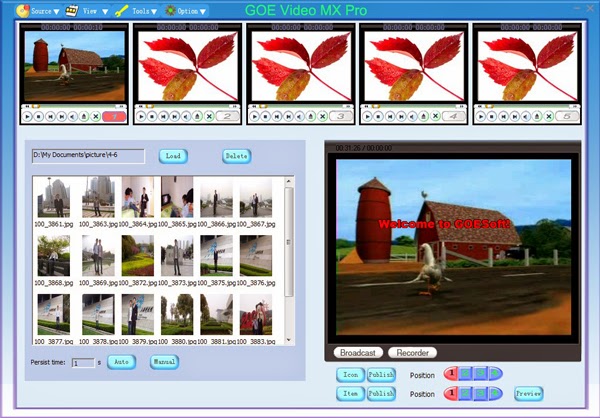
Key Features:
1. Easy to setup
It only needs a computer and usb supported camra to broadcast live video.
2. Enhanced functions
Supports title caption, channel, playing pictures, overlay video, recording, play list, drawing on video, adding icon, .etc.
3. Multiple outputs
Supports live video output, you can put the video stream to window media server.
Support LAN broadcast
Supports saving as WMV file.
4. Multi-Channels, multi-inputs
Supports filve channels.
Supports WDM drived camara, video card.
Supports multiple formats file: WMV, Real Media, Mpg, Mpeg4, AVI, .etc.
Each channel has play control functions.
5. Switch seamlessly
Supports channels seamlessly switching.
Supports pictures seamlessly switching.
6. Title caption
Supports autoticly and manually add title caption.
7. Picture playing
Supports autoticly and manually picture playing.
9. Video overlay
Supports four channel video or audio overlay.
Each overlay video has play control functions.
10. Draw on video
Supports drawing anything you want using the shapes provided, you can alse easily clear all of the drawing.
11. Add icon, item
Supports adding icon to the video customly.
Supports .bmp, .jpg, .png files.
Supports background color transparentizing.
Tenorshare Card Data Recovery for Windows
2014-04-02 16:40:00 (читать в оригинале)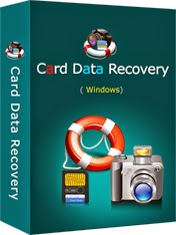
Tenorshare Card Data Recovery for Windows
Card Data Recovery is a professional data recovery software specialized in recovering deleted, lost, corrupted or formatted photos, videos, music and other files from various storage devices including SD card, Mini SD card, Micro SD card, CF card, XD-picture card, MMC, memory stick, etc, as well as other storage devices like USB flash drive, pen drive, zip drive and floppy drive.
Card Data Recovery has been a best choice for users of home, business and enterprise with its user-friendly wizard-like interface, comprehensive function as well as its extremely competitive price.


Key Features of Card Data Recovery:
1. Reliable and 100% risk free.
2. Recover deleted, lost, corrupted or formatted photos, videos, and audio files.
3. Recover data from various storage devices like digital camera card, memory card, USB Drive, Pen Drive, SD cards, floppy disk, etc.
4. Support all Windows platforms (Windows XP/2000/2003/Vista, Windows 7) and common file systems (FAT12, FAT16, FAT32, EXT2 and NTFS).
5. Friendly interface with functions respectively divided.
6. Easy-to-use utility can be operated with no required skills or technique.
Amacsoft iPad/iPhone/iPod to Mac Transfer
2014-04-02 16:33:00 (читать в оригинале)
Amacsoft iPad/iPhone/iPod to Mac Transfer
Amacsoft iPad/iPhone/iPod to Mac Transfer, the combination of iPad to Mac Transfer, iPhone to Mac Transfer and iPod to Mac Transfer, can transfer/copy/backup Music, Movies, Photos, Books, Audiobooks, Voice Memos, Ringtones, Podcasts, TV Shows, Playlists from iPad to Mac, iPhone to Mac and iPod to Mac. So that you can recover any lost or missing files.

Transfer iPod to Mac
Transfer Music, Movies, Photos, Books, Voice Memos, Ringtones, Podcasts, TV Shows, Playlists from iPod to Mac.
Transfer iPhone to Mac
The iPhone to Mac Transfer allows you to transfer Music, Movies, Photos, Books, Voice Memos, Ringtones, Podcasts, TV Shows, Playlists from iPhone to Mac.
Transfer iPad to Mac
Transfer Music, Movie, Photo, ePub, PDF, Audiobook, Voice Memo, Ringtone, Camera Roll, Podcast, TV Show from iPad to Mac for backup.
Identify iPad/iPhone/iPod info
Connected with Mac computer, the best iPad/iPhone/iPod to Mac Transfer can automatically show you iPad/iPhone/iPod model, capacity, version, format and serial number.
Two modes to view
Supports two modes for viewing movies, music and photos, so you can find what you want quickly when you transfer files.
Find what you want quickly
iPad/iPhone/iPod to Mac Transfer provides Filter and Quick Search tools to help you can locate movie/music/photo in your iPad/iPhone/iPod with quick search or filter files by artist, album, genre, composer.
Classic PDF Editor
2014-04-02 16:26:00 (читать в оригинале)
Classic PDF Editor
Classic PDF Editor is the easy, award-winning, high-performance alternative solution to Adobe Acrobat. It enables business professionals to edit 100% industry-standard PDF files with Adobe Acrobat?s essential features at a fraction of the price. The latest 12.0 version of Classic PDF Editor is 56% faster than any of its previous versions. This means you get smooth & optimized PDF processing when you work your way through the PDF documents. The installer setups the software in 2 short minutes & you can start working immediately. You can use Classic PDF Editor to view, create, convert, edit, modify, combine, secure, fill, bookmark, annotate, import, export and email PDF documents & Forms. Classic PDF Editor has been built keeping in mind the simplicity that a novice user wants & its user friendly interface makes even the advanced features very easy to use. A detailed User Guide is provided with the software to explain each feature. Additionally, our 24/7 free customer service is always there to help you in case you face any issue.

NetCamCenter Basic 3.0 - 4 camera version
2014-04-02 15:58:00 (читать в оригинале)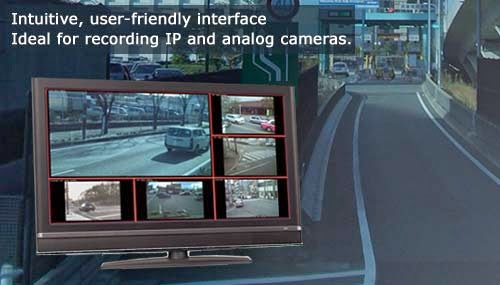
NetCamCenter Basic 3.0 - 4 camera version
Designed for monitoring and recording multiple IP cameras and video servers. Easy-to-use interface ensures smooth navigation as you work with the application.
A brief list of product features:
. Supports wide variety of network cameras and DirectShow devices.
. Various screen layouts.
. Supports multiple monitors.
. PTZ and digital PTZ.
. Motion detection.
. Continuous, Schedule, and Alarm Recording mode, auto deletes the oldest video file to recycle the hard disk space.
. Playback video and monitor remotely while recording video.
. Remote viewing with PC, iPhone, Android, Windows Phone and various devices.





Категория «Природа»
Взлеты Топ 5
 | ||
|
+402 |
425 |
MODRA_NEST |
|
+368 |
444 |
Zoxx.ru - Блог Металлиста |
|
+361 |
432 |
Kitten |
|
+318 |
438 |
RouxAngel |
|
+301 |
339 |
Painter-boy |
Падения Топ 5
 | ||
|
-1 |
135 |
Смотреть мир с Google Планета Земля |
|
-1 |
107 |
ZA7GORAMI.RU |
|
-2 |
148 |
Фотолаборатория: портретная и тематическая фотосъемка |
|
-3 |
165 |
TURMIR - ВЗГЛЯНИ НА МИР ПО ДРУГОМУ |
|
-9 |
9 |
BratAtor |

Популярные за сутки
Загрузка...

BlogRider.ru не имеет отношения к публикуемым в записях блогов материалам. Все записи
взяты из открытых общедоступных источников и являются собственностью их авторов.
взяты из открытых общедоступных источников и являются собственностью их авторов.